This guide walks you through installing and running Stable Diffusion WebUI (AUTOMATIC1111) on a GPU-enabled Linux server, so you can generate images directly from your browser.
Requirements
- A Linux server with NVIDIA GPU (ensure VRAM matches your model’s requirements)
- Stable internet connection and sufficient disk space (models may require 10–20GB+)
Step 1: Prepare the system
# apt-get update

# apt install -y wget git python3 python3-venv libgl1 libglib2.0-0

Step 2: Download WebUI Script
# cd /data

# wget -q https://raw.githubusercontent.com/AUTOMATIC1111/stable-diffusion-webui/master/webui.sh

# chmod 700 webui.sh

# sed -i '/SCRIPT_DIR=/a export STABLE_DIFFUSION_REPO="https://github.com/w-e-w/stablediffusion.git"\nexport STABLE_DIFFUSION_XL_REPO="https://github.com/w-e-w/generative-models.git"' webui.sh

Step 3: Run WebUI
Start the WebUI, binding to 0.0.0.0 so it’s accessible remotely:
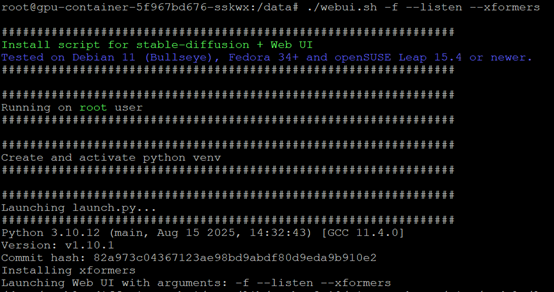
# ./webui.sh -f --listen
(Optional: specify a port, default is 7860)
# ./webui.sh -f --listen --xformers
Logs will be stored inside the stable-diffusion-webui folder after first run.
Step 4: Configure Firewall
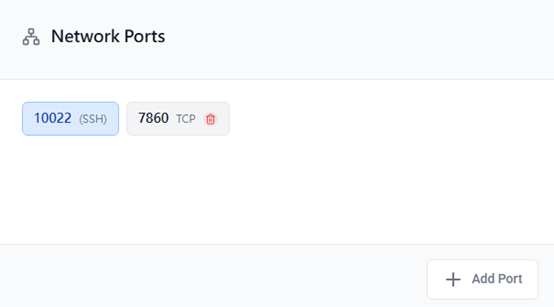
Allow external access to port 7860 (or whichever port you chose).
Step 5: Access the WebUI
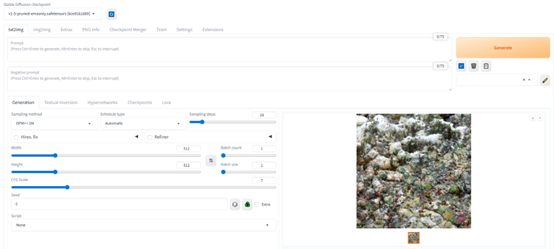
Open your browser and visit:
http://your-server-ip:7860
⚠️ Common Issues
VRAM not enough: Use a smaller model (e.g., SD 1.5) or try optimized forks (e.g., xformers)
Dependency errors: Ensure Python 3.10+ and NVIDIA drivers are installed properly
Exposed to internet: Secure with password, HTTPS, or run behind reverse proxy (nginx)
Missing models: Place model .ckpt or .safetensors in /data/stable-diffusion-webui/models/Stable-diffusion